



技術支援
如何上載網頁:
Cgi程式設定:
管理電郵帳戶
如何收取 E-Mail:
Form to Mail的設定(FrontPage)或(Dreamweaver or HTML)
實例說明
如何在 FrontPage 使用Form to Mail
步驟一:請先在你的 Form 上 right click 一下,再按 "Form Properties...",會看到以下功能表。
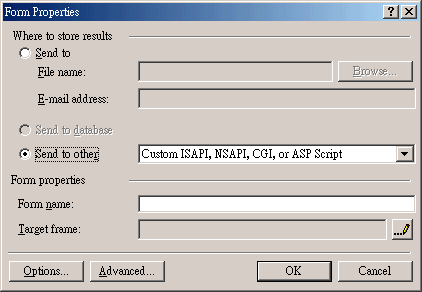
圖一
並選擇Send to other。
步驟二:然後按下 "Options...",在圖二的 "Action:" 欄位改為 "/cgi2/formmail.pl" ,(在二000年九月二十日前申請的客戶,請使用 "/cgi-bin/formmail.pl" ),再按ok。

圖二
步驟三: 之後請在圖一中選擇 "Advanced...",在跳出的 "Advanced Form Properties"按一下 "Add" 鍵,填入圖三的 "Name"和 "Value" 欄位:
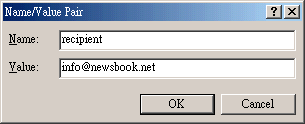
recipient value = "info@newsbook.net"
(設定為您自己的電郵名稱,例如: abc@abc.com)

redirect value = "http://www.newsbook.net"
(填完了表格之後,要連結到那個網站或網頁(如網頁要輸入整個URL))
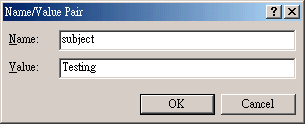
subject value ="Testing"
(E-mail 的 Subject)
步驟四: 完成後 "Advanced Form Properties" 會收取到以下資料:
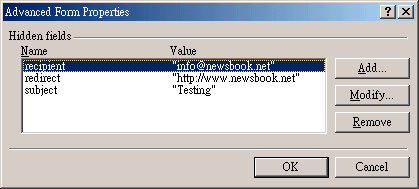
按 "ok" 離開。
以上是在 "FrontPage" 的 form to mail 設定,若你是使用Dreamweaver 或 HTML 編寫,請直接加入以下幾句 html code在你的網頁中:
(在二000年九月二十日前申請的客戶,請使用 "/cgi-bin/formmail.pl" )
<form method="POST" action="/cgi2/formmail.pl">
    <input type="hidden" name="recipient" value="info@newsbook.net">
    <input type="hidden" name="redirect" value="http://www.newsbook.net">
    <input type="hidden" name="subject" value="Testing">
    ......(其他的內容請自行修改)
</form>